- Katy Patrick
- News
Keystone Systems is pleased to announce an updated version of the Scribe, our duplication on demand appliance.
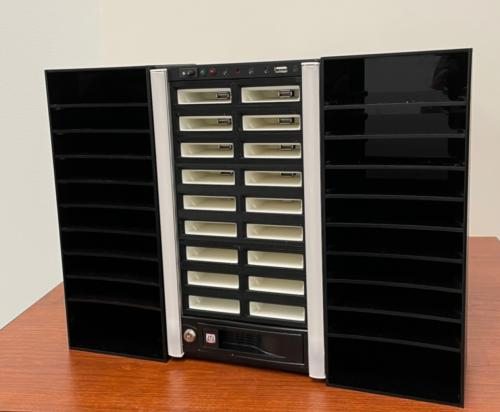
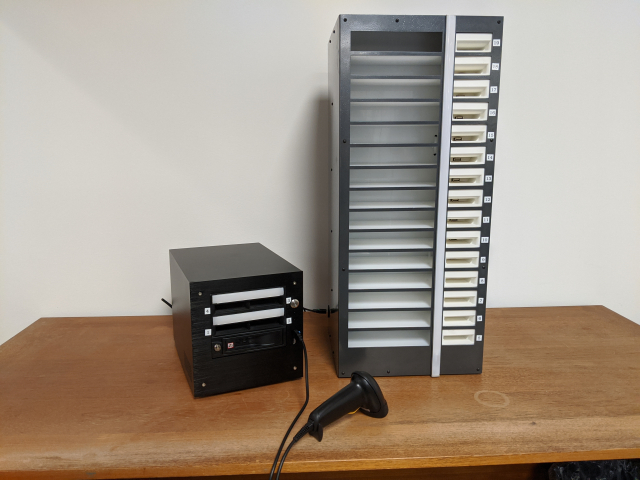
The Scribe 2.0 merges the current Scribe components into a single unit thus providing the computing and storage of the Scribe Mini along with the duplication slots of the Scribe Tower in one device. It is a smaller package, with the cartridge slots being more tightly packed than the current Scribe Tower and new shelving units on each side providing organization for the mail cards.
The new design makes use of a manufactured computer case, meaning we longer need to manufacture Scribe Tower cases locally which was one of the recent bottlenecks in filling Scribe orders.
The Scribe 2.0 maintains the light strips to provide the status of each duplication slot by indicating whether it is duplicating a cartridge, completed, or has encountered an error. However, the hardware controlling the light strip has been updated to a new component we can control, with the expectation that the lights remain more reliable.
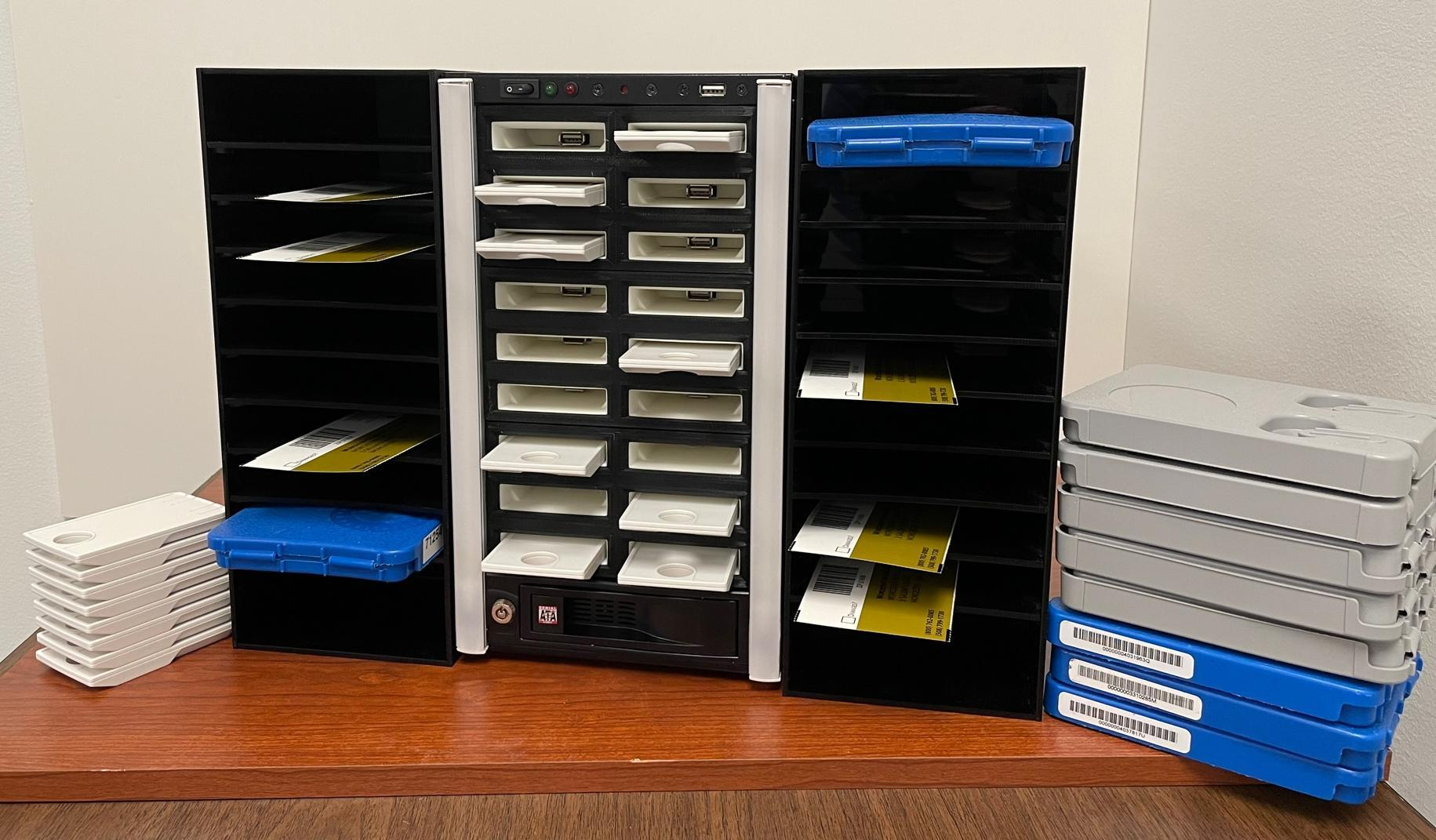
(click on the image for a closer look)
All Scribe Systems (whether a standalone Mini, a Mini plus Tower, or the new Scribe 2.0) have access to the same functions, including the web monitor, regular and walk-in duplication modes, and the upcoming ability to unlock and repurpose white NLS cartridges.
Due to increases in the prices of components, please call 800-222-9711 or email () for current pricing. Existing orders for Scribes will be fulfilled with Scribe 2.0 systems, and the pricing at the time of order will be honored.
- Andrea Ewing Callicutt
- News
Keystone is excited to announce that we've signed an agreement with the National Library Service for the Blind and Print Disabled (NLS) to allow our Scribe Duplication on Demand system to unlock the white, pre-loaded NLS cartridges for repurposing.
Our developers have already begun working on adding this feature to KLAS and expect the initial release of this new functionality to be in the next month.
We plan for the unlock process to be very simple. When you plug a cartridge in to the Scribe to duplicate onto it, the Scribe will check to see if the cartridge needs to be processed. If the cartridge is one the system hasn't seen before, it will process it, ensure we can unlock it, and then follow the NLS guidelines setting the passphrase to be consistent across the network for all repurposed NLS cartridges.
For any cartridges that can't be processed as part of duplication, there will also be a separate mode which allows staff greater control, ensuring all cartridges can be processed and unlocked.
We know this functionality is something our current and future Scribe libraries have been hoping for, and we're thrilled to now be able to bring it to you! Be on the lookout for a Weekly Wrap-up in the near future which will detail exactly which KLAS release includes the capability for Scribe to unlock ALL NLS cartridges.
Please be sure to let customer support know if you have any questions about the timeline or implementation process.

- Katy Patrick
- News
Did you attend our last webinar on Serials for Duplication, or watch the recording? Our panelists did a great job talking through their approaches and processes, and answering questions from attendees. Since this is such a big topic, with plenty of new complexities thrown in by the transition to Duplication, here’s a little extra follow-up.
To separate by Medium, or not?
In the roundtable, you heard some of our panelists use a separate Medium, such as “LDS,” for locally duplicated serials. Others use the same DB Medium used for books and physical DB serials. We covered some of the reasons in the roundtable, but just to clarify in black and white:
- Both approaches work—choose the one that fits your library’s needs.
- Using a separate Medium requires the patron to have a separate Medium Profile and a separate Service Queue.
- This allows you to set a Cutoff, Max Per Cart, and other settings that apply only to Magazine cartridges.
- This means Duplication Orders only contain books or magazines, never both.
- For Scribe, a separate Medium allows you to set a different leaflet or announcement file to include on Magazine vs book cartridges.
- We are looking into methods for separating Dup Order batches for handling by Medium, but nothing is in place just yet.
If you want to start Duplicating Serials as a separate Medium, several pieces of set-up will be needed. Contact Customer Support to get started.
Receive an Issue to trigger Retention
Some issues have been reported with getting Duplication-only Serials to obey the Retention settings. This is because the settings are attached to the Holding, which is associated with inventory. In other words, it was programmed expecting physical circulation, before we had any inkling of the need to duplicate serials on demand.
Right now, KLAS is not following Serial Retention settings if there isn't at least one Copy of an issue. So the fix is to Receive at least one Copy of each issue, even if you only plan to circulate the issue using Duplication. This allows you to “activate” the settings associated with the Holding, such as Retention.
Subscription Start Date
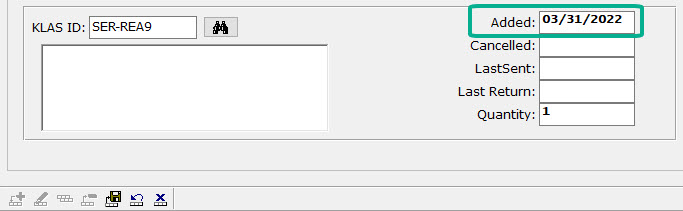
John Owen shared this tip in the roundtable. To prevent unnecessary Serial Reserves being created (and Assigned if the patron is not yet set up for Duplication), set the Start Date for new serial Subscriptions to tomorrow.
By forward-dating the subscription, you tell KLAS not to run the usual programs designed to get physical inventory assigned and out the door to new subscribers ASAP. Instead, the subscription will quietly become active overnight, overnight, and all new issues will be added to the patron's Service Queue as they are Received and the eDocs created.
We hope these insights are useful as you enter the brave new world of providing serials within a duplication on demand service model. As always, please don't hesitate to contact support with any questions.
- Andrea Ewing Callicutt
- News
The KLAS Users Program Committee and Keystone are excited to share details about our next two online training and networking opportunities. Please let us know if you have any questions about either, or any other training opportunities (such as KLAS Administrator Training).
Keystone-Presented April Webinar
What resources are available to help new users get up-to-speed on KLAS, and what is still needed? Come find out what's on offer and provide your suggestions and requests for future offerings at our April Keystone-presented webinar.
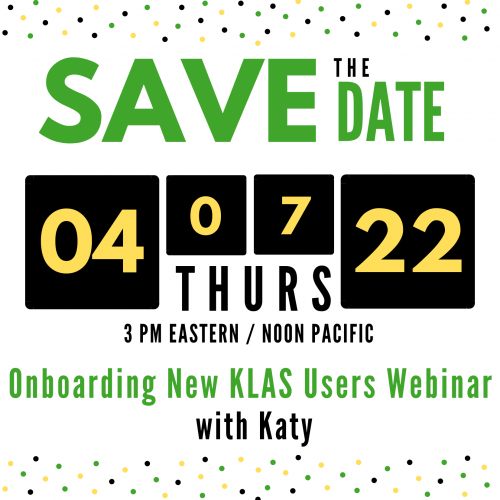
- Date: Thursday, April 7, 2022
- Time: 3:00 PM Eastern / Noon Pacific
As usual, the Zoom link and dial-in number for audio will be provided in the KLASusers Knowledge Base approximately one week prior.
May KLAS Users' Online Mini-Conference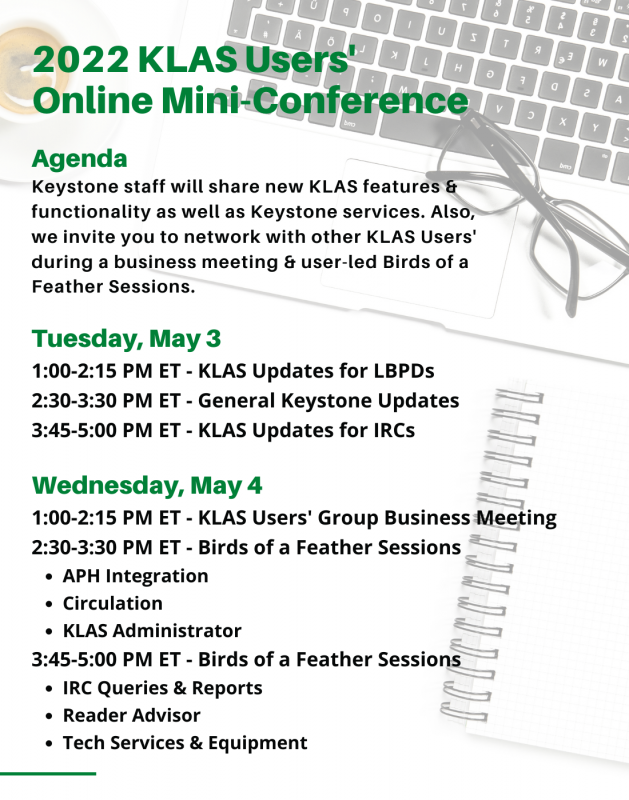
The KLAS Users' Group Program Committee is excited to announce the dates and planned schedule for the 2022 KLAS Users Online Mini-Conference to be held May 3-4. Tuesday's sessions will be presented by Keystone staff and Wednesday's will be presented by various KLAS Users.
We aimed to include topics that will appeal to all aspects of the KLAS Users' Community, so be sure to mark your calendar now and don't miss this fantastic online training and networking opportunity!
- Dates: Tuesday, May 3 - Wednesday, May 4, 2022
- Time: 1:00-5:00 PM Eastern / 10:00 AM-2:00 PM Pacific
Mini-Conference Agenda:
Keystone staff will share new KLAS features & functionality as well as Keystone services. Also, we invite you to network with other KLAS Users' during a business meeting & user-led Birds of a Feather sessions.
Tuesday, May 3
1:00-2:15 PM ET - KLAS Updates for LBPDs
2:30-3:30 PM ET - General Keystone Updates
3:45-5:00 PM ET - KLAS Updates for IRCs
Wednesday, May 4
1:00-2:15 PM ET - KLAS Users' Group Business Meeting
2:30-3:30 PM ET - Birds of a Feather Sessions
- APH Integration
- Circulation
- KLAS Administrator
3:45-5:00 PM ET - Birds of a Feather Sessions
- IRC Queries & Reports
- Reader Advisor
- Tech Services & Equipment
Registration:
Registration is not required, but it will give us an idea of how many attendees plan to attend. Also, persons who register will receive an email approximately one week before the mini-conference with all the agenda, Zoom links, and dial-in for audio numbers.
- Katy Patrick
- News
With KLAS release 7.7.65 in the final stages of testing before going out to Early Release, let’s take a look at the series improvements we’ve been working on.
Service Order Preference
When you add or update a Series Preference after getting this update, you’ll have a new field: Service Order.
This defaults to Sequence, which will send series book out according to the cataloged Sequence as KLAS has always done it, plus all the new updates below. However, you will also have the option of switching the preference to PubDate—allowing the patron to receive the series in order by Publication Date!

Some series (especially some of those long-running science fiction and fantasy series) have a contested read order. We hope this option will allow your patrons more flexibility in how they receive their series, without adding extra work for your cataloger.
Multiple Ordered Series
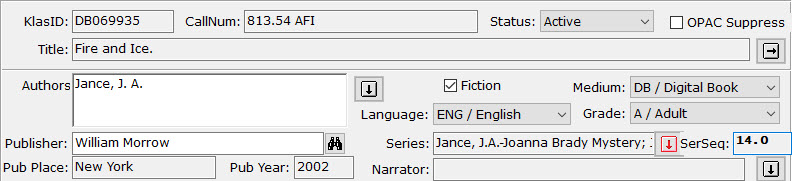
While the Title-Bib page in the KLAS Catalog module always allowed multiple Series to be selected, it only supported one Series Sequence. With this update, however, you will finally be able to apply a unique Series Sequence to every Series on a title!
Since the Series field is only long enough to display one series at a time, the Heading Select button will be flagged red as a heads-up if multiple series are selected. Screen reader users will be able to hear all applied series listed in the field, as they don’t have to contend with the limited display area. The Series will be listed in order from the lowest sequence to the highest.
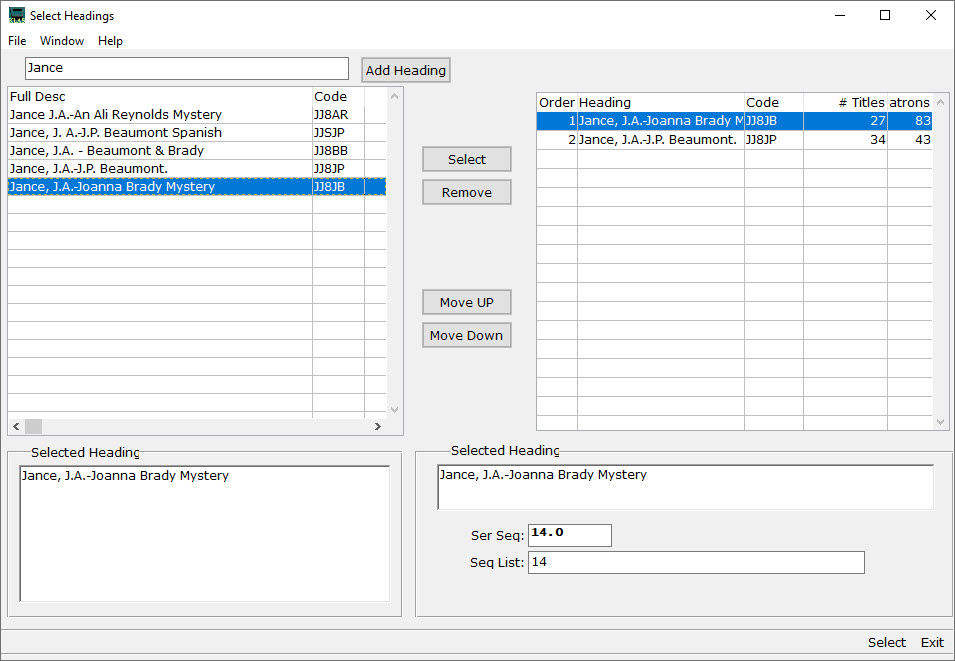
The SerSeq field will display only the lowest sequence for that title. All of the sequences can be viewed series by series on the Select Headings screen.
Once a Series Sequence is set for each series a title is part of, any of those series will send that title in the correct order. If a patron has a preference for both series attached to a title, they will get the title from both series, as long as it is not currently a HasNow (including being already in the Service Queue or in a pending Duplication Order). This will allow the patron to read the book again in context of the second series, or safely skip it the first time it's received if they want to avoid spoilers for the other series, knowing they’ll get it again when they catch up in the other series. If they still have the title from the first series, the second series simply skips it and continues with the next title in their preferred service order.
Multiple Sequences for one Series
In addition to being able to set a unique sequence for each series, you can also enter a list of sequences for one series. This allows KLAS to intelligently handle compilation titles, where NLS included multiple books on one cartridge / in one recording.
For a title with books 1-3, you can tell KLAS the title includes sequences 1,2,3. If the patron already had book 1, and books 2 and 3 are also available as single-book titles, KLAS will send the singles instead of repeating book 1. If any sequence is only available in the compilation, KLAS sends the compilation instead of any single-book titles, even if a patron already had one or more books on the compilation. And if all titles are available both ways, and the patron hasn’t had anything on the compilation yet, KLAS will send whichever ‘set’ of books is newest, as determined by the Pub Date, with the date added to the catalog as a tie-breaker.
In short: KLAS will send every book in the series, as identified by SerSeq, with as few duplications as possible. When it has an otherwise equal choice, it will aim for a newer recording.
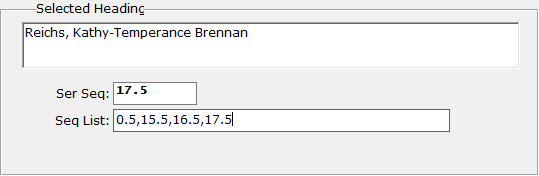
You can also have compilations with a sequence list with gaps in it, usually for a collection of novellas that go in-between various "main" series books. The SerSeq, used to determine where in sequence a title should be sent, is still controlled separately from the list. This allows you to control whether this type of collection should be sent as the first sequence (0.5 in the above example, allowing the patron to read the prequel before book 1), the last sequence (17.5 in the example, ensuring the patron won’t get any spoilers for books they haven’t gotten to yet), or after all other titles in the series (SerSeq 99 will usually be safe).
Of course, for patrons with a “PubDate” service order for their Series preference, the SerSeq will be ignored in favor of the Pub Date; however, the Seq List can be used to identify unique vs duplicate series books (as in, has the patron already had some of the books in this compilation? Are all of them available another way?).
Some nitty-gritty extra detail: The SerSeq must be included in the list (so if forcing the above example to the end of the series, the list would become 0.5,2.5,9.5,13.5,99.0). Remember these sequences are used to identify duplicate books in the series, so if you have a stand-alone 13.5 and a compilation 13.5, KLAS will try to only send one version. However, if you have two such compilations, with at least one SerSeq in each list only available in that compilation, they will both be sent even if they were both seq 99, to ensure all unique sequences are sent.
Select Headings
Both the SerSeq and Sequence List are set on the Select Headings screen, which has also gotten a couple “bonus” upgrades while we were adding the new fields.
The change list includes:
- Search field is now a “matches” filter, not a “begins” search
- Number of associated Titles and Patrons now included in both halves of the screen
- “Relator” field added for Author and Narrator headings
- SerSeq and Sequence List fields added for Series headings
This means that, instead of typing in letters to skip to the part of the list that begins with those letters, you can now filter the left-hand list using a “matches” search against any part of the series. Not sure whch author a multi-authored series is listed under? No problem—just type in one or more words from the series description, and hit Tab to see only the results.
The search will include the author, series description, and fuller form fields. So, if an alternate series title is entered in the main heading’s MARC data as a fuller form, you can then filter for the series using either title. If a heading has a fuller form, it will display along with the full description in the “Selected Heading” field in both column’s detail viewer.
Note: the search words will be treated as a complete string, not keywords. “Wild West” will match “Wild, Wild West,” and “Untamed Wild West,” but not “Wild, Wooly West” or “West, Wild and Wilder.”
To return to the full list, delete everything from the search field and press Tab again.
Finally, about those “relator” terms: in brief, those allow for accurate MARC tags for Editors, Translators, and the like. They can be set for any selected Author or Narrator heading in the same part of the Select Headings screen where SerSeq and Sequence List are set for series. If more information on Relators is needed and wanted—let me know and I’ll get it out to you!
Next Steps
This is all wonderful, of course (or so we hope), but we know updating the whole back-catalog can be a daunting task. How do you go about getting all of this set up for all of the series in the collection?
We’d love to do it all automatically... unfortunately, that isn’t feasible with the variety of approaches libraries have taken to their series cataloging, and the need to preserve any other cataloging changes made to titles vs their original MARC data from NLS.
We have, however, done our best to make sure as much data as possible can be brought in from newly-imported MARC data, and to make sure series MARC data exports as well as possible from KLAS. To take advantage of this, you may need your Filter set-up adjusted.
Your best bet will be (once you get the update to use Headings Maintenance to sort your series by # Patrons. That will identify your most popular series, and those will be the ones most worth reviewing to correct/update the series information on each title.
Then, when you next import MARC records take a look at how the series data comes in, and contact us to discuss any changes that are needed to your filters to ensure you get as much automatically as possible.
Conclusion
This is a big, complicated update on every front: the work needed to make it happen, the patron service implications, and even the task of explaining all of those implications. We’ve done our best to ensure that these changes result in better service, with the least work needed on your part, with as much room for flexibility and control as possible.
Big, big thanks to the KLAS Development Advisory Committee (KDAC) for help steering these changes and informing service decisions (such as when to send a compilation vs the same set as single-title recordings), and to Brian White, who did the bulk of the actual programming as his final project for Keystone.
We will continue to work with you to ease the cataloging transition, and to answer questions either now or as they arise.
We hope this update is a big improvement for you and your patrons!

- Katy Patrick
- News
“Life is a journey, not a destination.”
Ralph Waldo Emerson
Late last year, I reached the age where I became eligible for full Social Security retirement benefits. I decided at that point that I wanted to be able to spend time doing fun things with the family and travel during a time when my health was not a problem. My wife, Aimée, retired a couple of years ago, and she has been patiently waiting for me to join her. We have seen a goodly number of people who have worked longer years, and then had mobility or other health issues facing them by the time they retired. As such, during these last few weeks, I have been drawing to a close my time at Keystone.
When my career at Keystone started in August of 2004, I was unfamiliar with the programming language used here. I’ve always enjoyed learning new things, finding it fun to figure out how programming languages work. This set the stage for an enjoyable, new challenge.
The NLS Books on Tape program was not, however, unfamiliar territory. My father, Joe White, had retinitis pigmentosa, and his vision had regressed, several years prior to his passing in 2002, to the point where he was eligible for the program. He was a customer of the Louisiana State Library for the Blind and Physically Handicapped, and I had seen the tapes, floppy discs, green boxes, and the player when our family visited him and my mother at the house where I grew up. He often talked about how much he enjoyed listening to the books and magazines. He and my mother would comb through the TBT listings when they were sent, to pick out those titles he would be interested in hearing.
I’m a back-room kind of guy. I talk in geek-speak, and usually need real-people interpreters in order to effectively interact with customers. For that reason, you may not know me, even though I’ve been here a while. You may be more familiar with some of my favorite projects, in which I have played a major role, that are still around – Nightly (both the original, now termed “physical”, version and the more recent service queue fill version), Excel export, some accessibility improvements with browses and Supertabs, the Service Queue tab in the Patron module, and the PIMMS interface.
I won’t delve into the geekiness of all of the fun I had working on all of those (as well as others), but I would like to let you know that working on the nightly programs was a very personally rewarding experience. Though my Dad was no longer around, I still felt a personal connection to serving content to the patrons in the best way I could, because I approached the project as if my Dad were here to receive the results. (Louisiana is a KLAS customer; so, if he were still a patron, that would have been the case. How rewarding that would have been!)
There is one other project left for the end of this list. Along the way in my journey here, I have worked and reworked, and reworked again the series processing in KLAS. Aspects of series processing have gotten very complex over the years. In the latest KLAS release (7.7.65, currently in testing) is my last big project – taking into account when serving a patron a series involves a single title that appears in multiple series, or a single KLAS title that houses a compilation of multiple entries in a single series. It has been a fun challenge to end my time here. My sincere hope is that these updates serve you and the patrons well.
I have enjoyed working with the management and staff at Keystone. They have helped me grow over my time here, both technically and professionally. I have welcomed the times I have gotten to meet with you, the customers. It is both important and interesting to understand your work and how we software developers can best serve you. I appreciate your feedback, positive or negative, as it has always helped improve our process.
Thank you for all you do to serve this sector of the public. Your work is truly a valuable public service. I am genuinely honored to have played even a small part in it.
Peace and Good Fortune to you all!
Brian White
- Andrea Ewing Callicutt
- News
From the desk of James Burts, CEO, Keystone Systems:
Oh, for the good old days of just writing software…..(aka logistics and parts availability for the KLAS Scribe)
*wistful sigh*
It’s times like these I look back longingly when Keystone only wrote software. Like many other companies, supply chain issues (especially motherboard availability) have plagued us recently making the production of Scribes and Scribe mini frustratingly slower than desired.
Months ago, we had a lengthy period where we had problems getting our Scribe tower parts produced, because the design file was corrupted. We got that resolved, and thought we were into clear sailing. Unfortunately, it feels like the world conspired against us, and we are now fighting parts availability issues we don’t have any control over.
The manufacturer of the cases we use for the Scribe Mini shutdown their production facility to re-tool and introduce some new models—one of which we are quite interested in. We stopped being able to receive any of those cases in early December, and now expect to get a shipment in the next week or two.
The motherboards we have to use in the Scribe have become extremely difficult to get our hands on. We have been waiting for several weeks for our most current order, and expect it will take perhaps another month to finally receive them.
The company that made the system we use to control the LED light strips went out of business due to slumping sales in the pandemic. We are working to create a replacement for this component with a much more commonly available Raspberry Pi microcontroller, but we had to write the software to have the Raspberry Pi do the things we need.
The power supplies we use in the Scribe Mini have also been very difficult to purchase.
Things have been improving lately. We expect to receive a shipment of Scribe Mini cases in the next week or so. Our Raspberry Pi version of the light controller looks to be more reliable, and development should be wrapped up on it in the next week or so. We plan to installed it at a beta site or two shortly.
Our biggest issue remains motherboards. We have a number of orders outstanding, and our best hope for anything beyond just one motherboard is looking to be at least a month away.
From my current perspective, I’m really missing the good old days that didn’t include shipping and logistics headaches as we strive to provide a quality product for you. However, we’ll push through this and look forward to getting more Scribes built and put to work for your libraries and patrons as soon as possible.
- Katy Patrick
- News
Hello, KLASusers! Although we are in an off-year between full KLAS Users’ Conferences, we still want provide opportunities for you to keep up-to-date on KLAS New Features, provide feedback and development requests, and network with each other. With that in mind, just like our last non-conference year, we are working with the Programming Committee to facilitate monthly webinars and will be hosting a “bite-sized” mini-conference this summer.
This began with last month’s Keystone-presented webinar on Cataloging for Duplication, and will continue following a pattern of one LBPD user-presented, one IRC user-presented, and one Keystone-presented webinar per quarter.
APH Roundtable Webinar
For this quarter’s IRC webinar, we have a Roundtable on the APH Census, with discussion on how you go about the census process and how KLAS can better support that work. That roundtable is scheduled for Tuesday, February 22nd, at 3pm Eastern Time, and will be moderated by Jared Leslie, Director of Media and Development at the Foundation for Blind Children in AZ, along with Sally Shreck, Specialized Media Coordinator at the Maryland School for the Blind IRC, and Allen Huang, Director of Accessible Instructional Materials and Outreach Services, and Kathy Segers, Educational Consultant, at Tennessee Resource Center for the Visually Impaired. We hope you’ll be able to join in, learn from their approaches, and provide your own perspective!
Connection details will be posted about one week before the webinar.
Save the Date: KLAS Mini-Conference
Like 2020’s mini-conference, we plan to take an afternoon in early May to share Keystone Updates and KLAS New Features. This year, we are also adding a second afternoon, which will include a Users’ Group Meeting to review and vote on a bylaws change, and a few user-led Birds-of-a-Feather sessions.
We plan to stagger IRC, General, and LBPD content as much as possible to ensure you get as much out of this as possible with the least time investment. While the exact schedule is still to be determined, we currently have the week of May 9th (the week before the NLS Conference) earmarked for our two-day, bite-sized, online mini-con.
Admin Training
While broader webinars and networking events are great, sometimes you need a more specific, hands-on, deep dive into KLAS and how to make it work best for your specific situation.
A fantastic way to do that is to join us for Administrator’s Training!
This year’s dates for Admins at LBPD libraries are:
- June 6-9, 2022
- September 12-15, 2022
We want to host a session for IRC Admins as well, but we need you to help us set the dates! If you can commit to a session, please let us know so we can work with you to set up dates.
Our Online Administrator's Training article has more info about training structure, pricing, and a link to register. Because of the significant time investment needed from Keystone staff to host Admin Training, we will need at least two confirmed attendees for any session to proceed.
- Andrea Ewing Callicutt
- News
2020 and 2021 were a challenging time for many of us, including our KLAS Users' Group Program Committee. Many members joined the committee with the intention of helping to plan an in-person conference. Then COVID happened, and we all came together to plan and execute a fully online conference instead. This shift meant evaluating and learning new software, preparing presenters for the new format, rethinking the conference schedule, and more! I am more than grateful to those who did this work. Understandably, when it came time to start planning content for this year, all but one committee member was ready for a break and stepped down from the committee.
In the past few months we've assembled a new team to plan ongoing content for our KLAS Users! Yesterday afternoon they met for the first time. Four new faces who have never served on a KLAS Users' Group Committee before, a new Users' Group Officer who is beginning their first term, and one seasoned Officer / Program Committee member are coming together to help bring you new webinars, online roundtables, and more in the next year!
2022 Program Committee Members:
- Jared Leslie, KLAS Users' Group Vice President & Program Committee Chair, Arizona Instructional Resource Center
- Michael Lang, KLAS Users' Group President & Former Program Committee Chair, Kansas Talking Book Library
- Lori Brown, Wolfner Talking Book and Braille Library (Missouri)
- Amanda Trawick, Alabama Regional Library for the Blind and Physically Handicapped
- Kate Kosior, South Dakota Braille & Talking Book Library
- Crystal Grimes, Oregon Talking Book and Braille Library
- Katy Patrick, Keystone Systems
- Drea Callicutt, Keystone Systems
1/25/22 Cataloging for Duplication Webinar
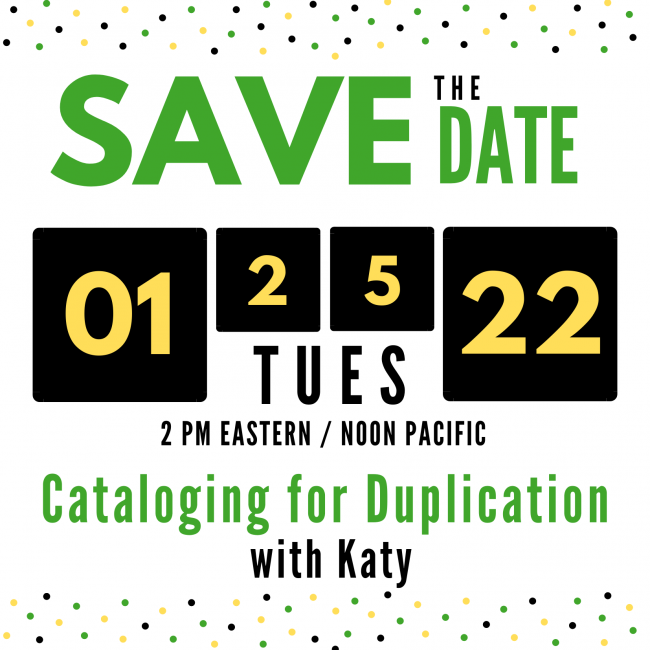
As their first piece of business, your new Program Committee scheduled a Keystone-presented webinar for Tuesday, January 25 at 2 PM Eastern / 11 AM Pacific. During this online training session, Katy Patrick will be discussing "Cataloging for Duplication" including handling withdrawn titles, updating new title records without physical copies coming in, and what eDocs are and where they come from. Mark your calendar now so you can join us Live! Connection information will be shared closer to the webinar.
What topics / presenters do you want?
Now, our newly reformed committee wants to ask: What kind of content you want? Is there a particular topic or presenter you'd like to hear about / from? Do you have something you'd like to present about, or are you willing to moderate a Roundtable or Birds of a Feather session?
Comment on this post or send an email to any committee member to share your thoughts, requests, and input!
- Katy Patrick
- News
It’s been another turbulent, often-difficult year, but once again, we’ve made it through. In fact, this year has seen a number of highlights for us! Here are a few of my high points:
We’ve revamped KLASusers.com to modernize it, make it more easily searchable, and present content by topic instead of by format. We’ve recently made another big stride towards this goal by adding the tag listing to the Knowledge Base and News areas, allowing you to easily browse some of our top topics.
We hosted our first-ever all-online KLAS Users’ Conference, allowing us to not only hold this years’ conference safely, but to include more of our users than ever before. We learned so much from this experience, and I’m sure we’ll benefit from that experience even if and when we move back to a primarily in-person event.
We continued to improve Duplication on Demand to make it as reliable, customizable, and powerful as you’d expect from KLAS. This included adding the Duplication Orders by Status report, new options for managing patron’s Service Queues, check-in alerts, and even (in our latest update) customizable sound support for Scribe systems, along with countless smaller tweaks, bug fixes, and “quality of life” improvements.
For our IRC customers, we have a strong start on integration with APH’s ordering system, which will allow you to submit Purchase Orders directly from KLAS, with Catalog integration coming soon as well. If you missed our update on this project earlier this month, make sure to check out the recording!
I could go on and on, but I’ll leave it here for now. After all, it’s about time to be closing the door on 2021, and looking ahead to the possibilities and promise of next year. Until then: best wishes for a happy and healthy 2022!

- Lee Higley
- News
Keystone Systems continues our analysis of the remote code execution vulnerability (CVE-2021-44228) related to Apache Log4j (a logging tool used in many Java-based applications) disclosed via GitHub on 9 Dec 2021. As we and the industry at large continue to gain a deeper understanding of the impact of this threat, we want to relay our current standing, mitigation of, and continued diligence to defend against this and other potential attacks.
In addition to monitoring the threat landscape for attacks and developing customer protections, our operations team has been analyzing our products and services to understand where Apache Log4j may be used, and are taking expedited steps to mitigate any instances. Currently, we have identified one piece of software core to the KLAS application that was vulnerable. The vendor that produces the software identified has provided mitigation steps for the Log4j threat, and those actions have been put into place in Keystone’s hosting environment. For Keystone’s self-hosted customers, if your IT has allowed us access to your system, we are rolling out this action as well.
If your IT department has questions, or for self-hosted customers that would like to apply the correction themselves, please don’t hesitate to contact Keystone. If you are interested in the technical details for the affected software, please see the vendor’s security report.
As always Keystone will continue to utilize industry best practices to keep your databases as safe as possible. Those practices include daily network and penetration scanning, enterprise class anti-virus software, daily malware scanning, and a dedicated patching schedule. If you, or your IT department, have any questions about Keystone’s security practices please submit a request for our annual SSAE SOC II audit report.
Thank you,
Lee Higley
IT Manager
Keystone Systems

- Andrea Ewing Callicutt
- News
Last week we announced the creation of a new KLASusers IRC listserv. This week, we want to share / remind you of the various ways KLAS Users can connect with one another, and how to subscribe to each:
- KLAS Users listserv
- KLAS IRC Users listserv
- KLASUsers.com discussion forum
- Comments on KLASUsers.com articles
KLASusers listserv
The KLASusers listserv is open to any and all KLAS Users, whether you're a library director, an IRC inventory clerk, a member of your organization's technical support staff, or anyone else who uses KLAS. Keystone staff typically send out our Weekly Wrap-up to this listserv every Friday which includes info about new articles and forum posts on KLASusers.com, MARC record updates, info about the current KLAS release, upcoming webinars and other online training opportunities, etc.
User discussion is also welcome and encouraged! However, please remember: Replies will go to the entire listserv. To reply only to the sender, use the "reply to sender" link in the email footer.
The easiest way to get signed up for the listserv is via the KLASUsers listserv subscription page, or you can send a list of names and email addresses for your organization to .
KLAS IRC Users listserv
Last week we shared info about our shiny, new KLAS IRC Users' listserv. We hope any and all instructional resource / materials center staff who use KLAS will subscribe to this more focused e-list. We will share the KLAS Users' Weekly Wrap-up to it which will contain both IRC and non-IRC related information to it (including the latest release, so you can stay up-to-date), but otherwise it be strictly IRC-relevant communications. If you haven't already, be sure to sign-up ASAP via the KLAS IRC Users' listserv subscription page.
User discussion is also welcome here, so long as it is IRC related.
KLASUsers.com Discussion Forum
Our discussion forums have been an integral part of KLASusers.com since it's launch. The benefits of the forums over listservs for sharing information include threading, the ability to subscribe only to desired areas, and a more easily browse- or searchable archive, compared to searching your inbox for an email you remember possible getting at some point. We encourage you to post questions, ideas, resources, and suggestions to the forums. Available categories for posts are based on the different KLAS modules, various parts of the KLAS User community (Ex: RA, IRC, AT, KLAS Novices, etc.), and even Keystone services.
Anyone can read the forums, but you must be signed into klasusers.com to create a post or reply. To request a klasusers.com account for yourself or a new staff member, please send an email to and include the following:
- Full Name
- Desired Log-in Name
- Email Address
- Name of Library / Organization
KLASUsers.com Article Comments
Did you know that if you reply to an article on klasusers.com, it will automatically become a forum post that Keystone staff and other users can view and respond to? Yes, you do have to be logged into klasusers.com to post a comment or question, but it's a great way to get clarification on a post, share your insight or feedback, or start a conversation relating it.

- Katy Patrick
- News
Hey, IRC KLAS-users! We’ve got several things of interest for you this week including:
- an updated Intro to KLAS user guide for IRCs
- an upcoming webinar to talk APH Integration
- and best of all, a shiny new email listserv
Let’s talk details...
Intro to KLAS for IRCs
I’ve just posted an updated version of this user guide to the Knowledge Base. It includes an overview of all the main KLAS screens and some of its primary functions. You’ll find the download on the Intro to KLAS for IRC Users page.
Note: This manual was originally designed for print, and the images are not described. If you use Assistive Technology or otherwise cannot benefit from undescribed screenshots, please see the AT Reference Document as well for contextual information and text-only screen contents.
Upcoming Webinar
Don’t forget! The 12/14/2021 APH Integration Update Webinar is coming up fast, and we’d love to see you there. During this session, we plan to demonstrate KLAS screens, discuss planned workflows, share development updates, take suggestions, and answer questions.
Not sure what the APH Integration is, or wondering how it will help? Something in particular that you really, really hope it will do? Don’t miss this chance to get the inside scoop and make sure we know your priorities!
KLASusers-IRC Listserv
The main KLASUsers email listserv is available to anyone and everyone who uses KLAS... but with the transition to Duplication service, the need to keep up with NLS cataloguing, and just being a rather large and well-acquainted group, the LBPD / Talking Book Libraries tend to dominate the discussion.
We love hearing so much from them and seeing them use the list to work with each other, but we understand that you don’t need all that cluttering up your inboxes.
In an attempt to facilitate communication with and amongst our KLAS IRC Users', we've setup a new e-list specifically for you. We will cc: the new e-list with the KLAS Users' Weekly Wrap-up each Friday, which contains the latest KLASUsers.com content, release updates, forum posts, etc. for ALL KLASUsers. Otherwise, all emails to this list will be kept IRC-specific.
We hope you’ll subscribe to the listserv and join the discussion!
- Andrea Ewing Callicutt
- News
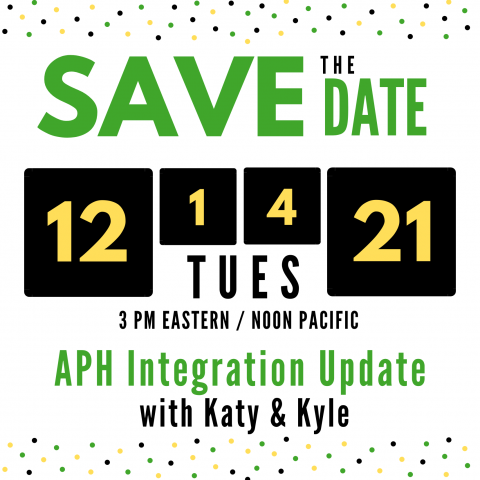
On Tuesday, December 14, 2021 at 3 PM Eastern / Noon Pacific Katy and Kyle will be offering a live webinar focused on sharing information and details about the integration between KLAS and APH's ordering system and catalog of products. During this session, we plan to demonstrate KLAS screens, discuss planned workflows, share development updates, take suggestions, and answer questions. We invite any and all Instructional Resource / Instructional Materials Center users to mark your calendar now and join us for this special Keystone webinar!
- Date: Tuesday, December 14, 2021
- Time: 3:00 PM Eastern Standard Time / Noon Pacific Standard Time
- Zoom Meeting Link: https://us02web.zoom.us/j/87018666883?pwd=WUZhSW5YVTBwRmxlVnRIQlpwZHhjUT09
If you have any questions or comments you wish to submit in advance, you can send them to:
In the meantime, we invite you to review the recordings of the APH 2021 KLAS IRC / IMC Users' Meeting from 10/12/2021 and the recent KLAS IRC / IMC Users' Roundtable held on 11/3/2021 during which we discussed the current status of the KLAS / APH Integration Project.
Full Connection info:
Join Zoom Meeting: https://us02web.zoom.us/j/87018666883?pwd=WUZhSW5YVTBwRmxlVnRIQlpwZHhjUT09
Meeting ID: 870 1866 6883
Passcode: 632597
One tap mobile
+19292056099,,87018666883#,,,,*632597# US (New York)
+13017158592,,87018666883#,,,,*632597# US (Washington DC)
Dial by your location
+1 929 205 6099 US (New York)
+1 301 715 8592 US (Washington DC)
+1 312 626 6799 US (Chicago)
+1 669 900 6833 US (San Jose)
+1 253 215 8782 US (Tacoma)
+1 346 248 7799 US (Houston)
Meeting ID: 870 1866 6883
Passcode: 632597
Find your local number: https://us02web.zoom.us/u/kda33PJihT
- Katy Patrick
- News
Have you noticed something new over on the Knowledge Base?
With the KLASusers redesign, we hoped to help you find resources without needing to navigate a bunch of menus or know how the specific content you were looking for was formatted. To do so, we condensed the site into just two areas (the Knowledge Base and KLAS News) with the expectation that users could find specific content using the search box or clicking through Tags.
This works well for some, but not for others. It didn’t help that articles were not displayed newest-to-oldest, but by subcategory.
Well, we've added something we think is going to be a big help!
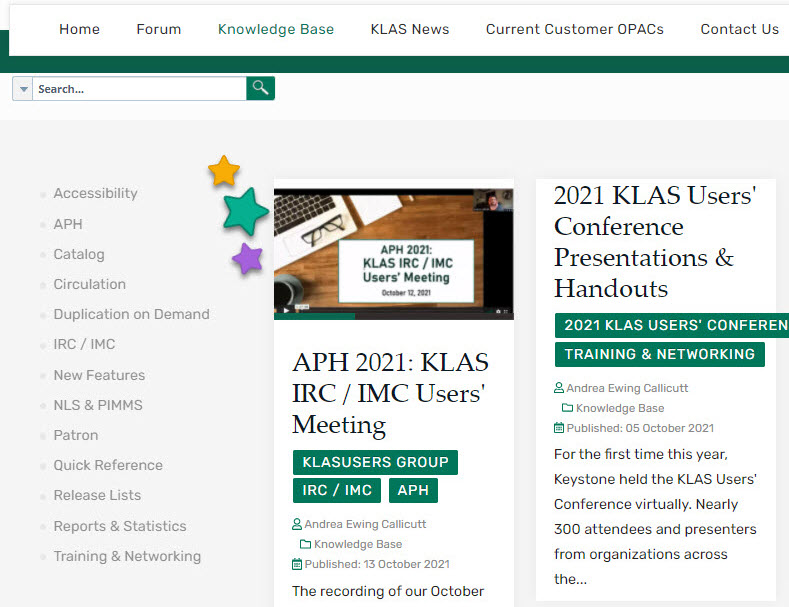
There's now sidebar on the left side the Knowledge Base, and it’s also coming soon to the KLAS News section. This isn’t a menu—you don’t need to figure out the one right path to get to the article you want. Instead, it’s a listing of Tags, and an article can have as many Tags as it needs to describe the content.
We hope these Tag lists will help you browse the site more easily, whether you’re after something specific or just seeing what’s available.
If you know exactly what you’re looking for or looking for something that isn’t in the tag list, you can still use the Search box to navigate the site as well. There are a couple tags with little (or any) content just yet—consider it a peek at my to-do list. I plan to fill in the Knowledge Base even more over time, so stay tuned. In the meantime, if there’s a tag you think we should add, please let us know!

- Maureen from FL
- News
This is a guest post by Maureen Dorosinski, Librarian / Production Supervisor, Florida Bureau of Braille and Talking Book Library Services.
The question:
Meagan from FL1M had a question: “Do we have exclusions for certain dates? Many of our patrons are auto select from their preferences, but only want books from a certain time period.”
Nancy at KLAS suggested we could set up subject codes based on dates. For example, instead of putting everything in the "Bestseller" category, a Bestsellers of the 1990s, Bestsellers of the 80s, category.
First Stop:
Nancy completed a process of setting up the bestseller codes for the various decades. She set the following in place, and filled them:
- BEF50 / BEN50 - fiction and nonfiction prior to 1970
- BEF70 / BEN70 - fiction and nonfiction from 1970 - 1979
- BEF80 / BEN80 - fiction and nonfiction from 1980 - 1989
- BEF90 / BEN90 - fiction and nonfiction from 1990 - 1999
- BEF00 / BEN00 - fiction and nonfiction from 2000 - 2009
In putting these codes on the titles, she also removed the generic BES, BEF and BEN codes, so what is remaining in those subject headings are the more recently published titles.
Second Stop:
Since NLS uses an amalgam of LA Times, New York Times, USA Today, and Washington Post bestseller lists to tag books, our cataloger Dina took things to the next level and further populated these tags from NLS by searching all the New York Times Bestsellers, and adding the appropriate subject headings to previously unnoted bestsellers.
To streamline the process, she went to Bookshare.org. They have a section of the top 10 fiction and non-fiction titles from the NYT list, these lists round up the titles without repeating them, and can be filtered by year and month.
Going Forward:
Nancy says the automatic codes being used are BES, BEF and BEN. When MARC records come in, those are updated. If, in your review, you see a recently added title that was originally published in 1970, you might want to add the 1970 bestseller code to it, but other than that, those should stay pretty static. And yes, remind the RAs that these categories exist, for either selection or exclusion.
Maybe another library could continue, Dina says we'll have to add subject headings for the 2010s and (eventually) the 2020s and assign them as appropriate. Maybe you will share their queries with us to import!
Get Bestsellers By Decades at Your Library:
I have attached the text queries with all the books we have tagged in each of the categories. To apply them in your catalog:
- Add the new subject codes as listed above to your catalog using Headings Maintenance.
- Import the first query file.
- Use the Change Headings - Query Set tool to apply the new heading to the Query Set and remove the old heading.
- Repeat for each of the query files.
I’m sure KLAS would help out if you need them!
Downloads:
Thank you!
Maureen in FL
- Katy Patrick
- News
The 2021 KLAS Users’ Conference presentations are now available for download!
In case that feels a little late in coming... no, we didn’t just forget. In fact, the presentations have been available to attendees this whole time, along with the full session recordings, on the PheedLoop conference platform. The reason these presentations are now available here as well is to make them available to those who were not able to join us for the conference.
We want to make sure that those who pay to attend the conference get ample value for it, and plenty of justification for their state agencies. The conference is not a profit-generating event for Keystone, but those registration fees are necessary to cover expenses, whether those expenses are for online event hosting or in-person. With an online conference, there was concern that, if the full recordings were available to everyone, funding agencies may wonder why they should pay for you to attend live sessions at the next conference.
However, we also know that you don’t necessarily choose your funding agency or their restrictions, and many states have very real budget constrictions. We don’t want to leave those of you who can’t attend the conference in the dark!
In committee discussion, this was identified as our solution: the conference presentations (but not the full recordings) would be made freely available after a delay.
We hope this is a help to those of you who weren’t able to join us (without causing trouble for those who were)!
Not sure where to start? We had a fantastic slate of presentations this year, but here are a few of my personal recommendations:
TLDR; Too Long, Didn’t Read
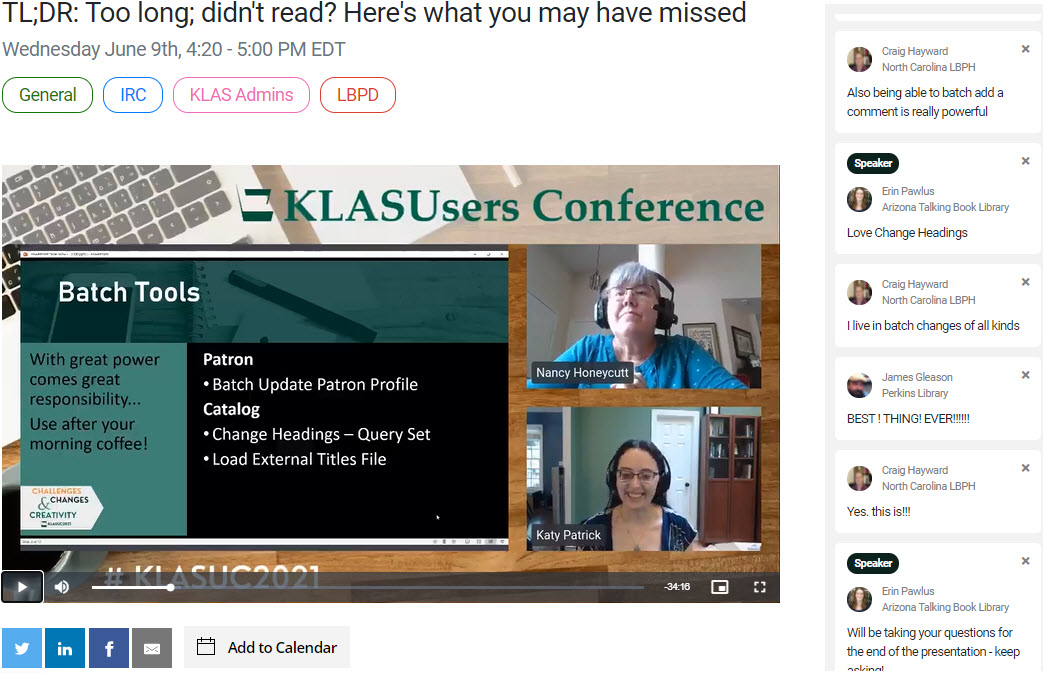
Have trouble keeping up with all the KLAS New Features? Just want to make sure you haven’t missed something important? This session was a look back at some of the best improvements and new features of 7.7, hosted by Nancy and yours truly. In addition to the presentation, instructions and an example user.ini are also available, due to request during the live session.
Nightly Configuration: Understanding How Titles Make It To The Service Queue
Sam Lundburg did a lot of research and testing and knocked it out of the park with his deep dive into Nightly Configuration for Duplication. If you want to know more about how Nightly chooses books for the Service Queue and how you can adjust it to work in your favor, don’t miss this presentation! (Note: please do not hesitate to contact Keystone Customer Support for assistance with your Nightly Configuration.)
X MARCs the Spot: Subject and Series Mapping in KLAS
If you have questions about subject mapping or just wonder what the deal is with the subjects that do (or don’t) show up with new MARC records, read up on it here. Erin Pawlus and Dylan Calhoon share their experiences and lessons about Subject and Series mapping, with plenty of great takeaway information.
P.S. Google Drive Tip
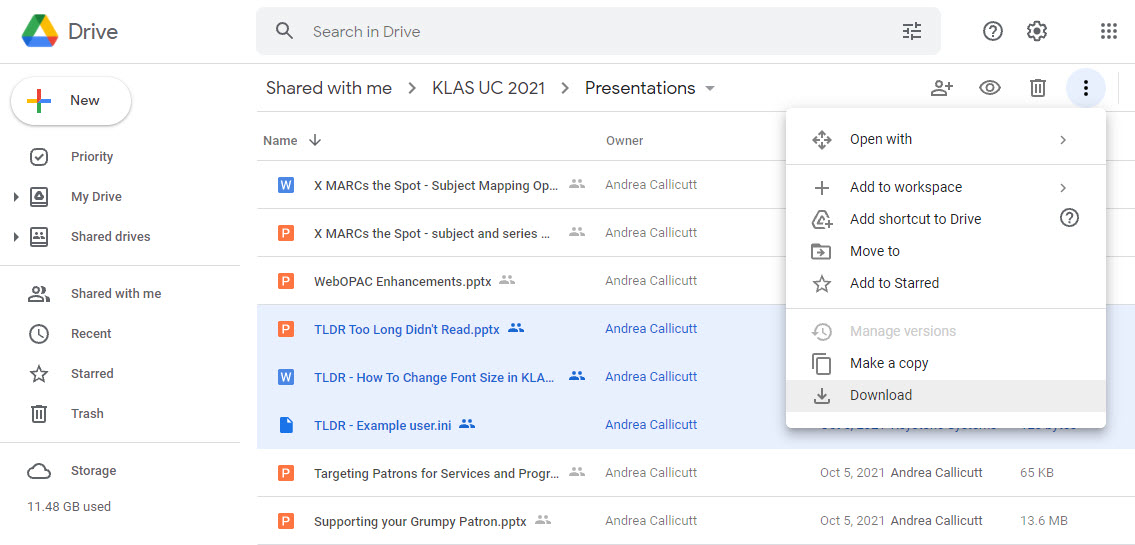
Did you know you can download multiple files from a Google Drive all at once? Due to the number of files available, we felt that this feature would be worth hosting the files on Google rather than on KLASusers itself.
Select all of the files you want (using shift or control), then use the menu icon and choose Download. Google will collect all of the selected files into a zipped folder and start the download automatically.
- Sam Lundberg
- News
This is a guest post by Sam Lundberg - Reader Advisor for the New Mexico State Library for the Blind & Print Disabled, and current President of the KLAS Development Advisory Committee.
We’ve had a lot of interest recently from across the community for Nightly AutoSelect to be more “series smart,” and not send book 3 in a series before a patron has had book 1. I’m among the chorus that’s been asking for this since the beginning of DoD, but I think it is worth talking about exactly how we want this to work. There are a lot of different ways that Nightly could be series smart, each with a different impact on the patron experience.
I’m going to lay out a few of the ways that I’ve thought of, along with advantages and possible drawbacks. I’d love to hear what others have been thinking on this subject, and I’m sure Keystone would appreciate knowing exactly what we want, rather than a vague mission to make it better.
As a preface, I have no idea how practical any of these solutions are from a programming side. I’ve tried to lay out specific rules that an algorithm could follow, but that doesn’t mean they would be easy, or even possible, to put in place. Some of these rules may also bog Nightly down to a crawl, requiring more time to run each night. This is a thought exercise to figure out exactly what we, as a community, want, rather than a menu of actual possibilities.
Option 1
1a) “First in the series only”
- When Nightly picks a title by Subject, it checks the “series sequence” field and excludes any book with a value greater than 1.
This is basically what is accomplished by libraries that use a “Sequel” subject code. Autoselect wouldn’t send out any sequels, which would exclude a large number of books from popular authors who write primarily or exclusively series. For context, I just ran a query and found that 321 of the 564 mystery titles we’ve added this year have a series sequence between 2 and 999.
Since this would be based on a Nightly setting, it would be library-wide rather than patron by patron. However, if KLAS also adds the ability to customize Nightly Functions by Serve Code, you could create an “AutoSelect No Sequels” serve code and an “AutoSelect All” serve code and select the appropriate one for each patron.
1b) “First or next in series only”
- When Nightly picks a title by Subject, it checks the “series sequence” field and excludes any book with a value greater than 1 UNLESS the patron has a “HasHad” for the previous book in the series..
Like 1a, except that subsequent books in a series can be sent if the patron is caught up in that series. This would help increase the available possible selections for series-heavy genres like Mystery. However, there is no mechanism for a patron to catch up on a series once they have missed a book, or for new patrons to get started on a long-standing series, without a specific request or Series preference.
Option 2
2a) “Not this book, but this series”
- When Nightly picks a title by Subject, it checks the “series” field and instead sends out the earliest book in that series not marked as “Has Had”.
The idea here is that, instead of sending out book 7 in a series, Nightly would go back and send out book 1 (or book 5 if the patron had the first four books already). This method would ensure that patrons are still able to access series books, but will always do so in order.
However, because the book Nightly initially found isn’t being sent out, there is no “Has Had” record added to that title, so Nightly will keep finding that book and sending books from that series over and over and over. How much of a problem this is will be very contextually dependent. If you use “Latest First” service for Subject, the books Nightly finds will change constantly.
But if you use “Earliest First” and don’t update your KLAS ID Ranges often, then nightly will check the same books every time. For instance, if your KLAS ID range starts at DB090000, Nightly will find Joanne Fluke and Stuart Woods at 90001 & 90002 respectively, so patrons with a mystery Subject preference would receive those entire series in rapid succession under this scheme. And given the prevalence of this sort of long-standing series, patrons may receive a large number of older titles as they are bumped back 20, 30, 50 books in a series.
2b) “Not this book, but where I left off this series”
- When nightly picks a title by Subject, it checks the “Series” field, locates the item with the highest series sequence in that series with a “Has Had” record, and sends the next book.
2a would fill in gaps if a patron skipped books or started with book 15. 2b wouldn’t fill in gaps, but would select the next book after the highest numbered book the patron has read.
For example, if a patron has read books 1, 2, 4, and 8 in a series and Nightly wants to send them book 10, 2a would instead send book 3, while 2b would send out book 9.
Option 3
3a) “Not this book, but this series, but not too often”
- When Nightly picks a title by Subject, it checks the “series” field and instead sends out the earliest book in this series not marked as “Has Had” UNLESS a book in this series is already in the Service Queue or a pending order, in which case Nightly will skip this title and series.
See Option 2, except that the frequency of a series being sent is gated by the length of the service queue, rather than the frequency the queue is refilled. If the patron’s service queue is 30 books long, you know there will be at least 30 books between each book in a series. However, this makes more sense for long running series than for short trilogies. I could see wanting to have different behaviors based on the length of the series, but that is getting complicated to keep track of. Keep in mind, this only applies to Subject and possibly Author. Books selected by Series, Request or Reserve would not have this same gating.
3b) “Not this book, but this series, but not too often, and picking up where I left off”
- When nightly picks a title by Subject, it checks the “Series” field and instead sends out the next book after the highest number book in the series marked as “Has Had”, or book 1 if the patron has not read any books in the series. UNLESS a book in this series is already in the service queue or a pending order, in which case nightly will skip this title and series.
Like 2b, this option just differentiates between filling in the gaps in a series or continuing from the highest numbered book a patron has read.
Option 4
4) “This book and this entire series”
- When nightly picks a title by Subject, it checks the “Series” field and queues all unread books in that series.
This could work well for shorter series, especially trilogies with a tight story, but would create a very hit-or-miss situation when dumping an entire 20+ book series. As with 2b, I worry that having a cutoff point for different behaviors would create confusion and unexpected outcomes. I think it would be possible to catalog our way out of this problem, flagging series as either a tight story or as episodic/procedural, but that isn’t something every library, including NM, could commit to. This rule would also need to differentiate between sequence 0 books (which are often more a collection and less a series) and numbered series.
Practically, I don’t think this could work as the default option given the sheer quantity of long-running series, but I could see this as an alternative that specific patrons would want to opt-in to.
Option 5
5) “Just care about what is in the Queue now”
- When Nightly picks a title by Subject, it checks the Service Queue for any books in the same Series. If another book in the queue is in the same Series and has a higher Series Sequence, the new book is placed ahead of the book already in the queue, rather than at the end.
Basically, if Nightly is trying to add book 2, and book 3 is already in the queue, book 2 is slotted just ahead of book 3, rather than at the end of the queue. This would only address the issue of patrons being sent books out of order in immediate proximity, such as when several books in a series are added at once by the NLS. Limited potential help but also limited potential harm.
So what option (listed above or something else entirely) would you want?
A big consideration is do we want this to be patron-by-patron? Or do we want it to be library-wide? And what do we want to be the default behavior vs. the opt-in behavior? Should this apply only to Subject selections, or Author as well?
Personally, I’m in favor of option 3b “Not this book, but this series, but not too often”. I think it addresses the core problem of books being sent out of order while avoiding any big drawbacks. It isn’t perfect, and will be clunky for short series, but that’s what Author Preferences and Reader Advisors are for. That said, I’m sure there are all sorts of circumstances I’m not accounting for that should be considered.
What are your thoughts? How, exactly, do you want Nightly to be series smart?
- Andrea Ewing Callicutt
- News
Today, I want to share a few items of particular interest to our Instructional Resource / Instructional Materials Center users including the upcoming users' meeting at APH, an update about our APH integration project, and a new IRC addition to our Users' Community. Read on for more info about each.
KLAS IRC / IMC Users at APH 2021 Annual Meeting
As you have probably heard, the 2021 American Printing House for the Blind Annual Meeting will be online again this year.
- KLAS IRC Users' Group Meeting at APH 2021: Tuesday, October 12 at 3:00-4:30 PM Eastern / Noon-1:30 PM Pacific
We are hosting the 2021 KLAS IRC / IMC Users' Meeting on our Zoom account.
Meeting Agenda:
- Keystone Update & Current Customers
- Community, Training & Events
- New KLAS IRC Features
- Upcoming Development
- Questions & Discussion
Meeting Invite:
Join Zoom Meeting: https://us02web.zoom.us/j/88072964152?pwd=NUltTVdISVRBS0VuS0Fud2VsUTZmQT09
Meeting ID: 880 7296 4152
Passcode: 167077
Dial-in for audio:
+1 929 205 6099 US (New York)
+1 301 715 8592 US (Washington DC)
+1 312 626 6799 US (Chicago)
+1 669 900 6833 US (San Jose)
+1 253 215 8782 US (Tacoma)
+1 346 248 7799 US (Houston)
Find your local number: https://us02web.zoom.us/u/kkZmZM6Wu
September 2021 APH Integration Status Update
During our August 24 KLAS New Features Webinar Katy shared the latest info on our ongoing project to integrate KLAS with APH's catalog and ordering system. We know many of you are excited and anticipating the completion of this integration project (as are we) because it means much less data entry and duplication of effort for your staff.
I asked Kyle Honeycutt, Manager of Software Development, for any additional updates he may want to share with our IRC / IMC users. This is what he said:
Using a tool called "PostMan," I have been able to successfully retrieve catalog information, post orders to their test system, and retrieve status of orders. I am in contact with APH and their contractors regarding what information is mapped in which fields, and what criteria to query on to retrieve exact catalog availability. Once all these questions are answered, the next step will be adding calls to these services within the KLAS programs.
Basically, we are using a known testing tool to confirm that the services work as expected, and that we know exactly how to consume them. Then we will introduce the complexity of consuming the processes from within KLAS.
What that means is: we're making good progress and using known tools and processes to accomplish the integration. At this point, our development needs to verify the item information being pulled from APH's catalog is identified correctly and then setup the service to pull it into KLAS in a logical manner.
New IRC Installation
Finally, I want to welcome a new instructional resource center to our KLAS Users' Community!
The West Virginia Instructional Resource Center began their implementation of KLAS this week with an onsite visit from Marion and Mitake. We're excited to work Debbie and her staff in the next few months as we learn their workflow, policies, and process and how to best make KLAS work for their organization and clients.
We're excited to have them on board, and hope you'll join us in extending a warm welcome.
- Katy Patrick
- News
During our latest New Features Webinar, we had a question about getting the complete list of all languages recognized by PIMMS. Here are some things to know about that list:
- The list that PIMMS adopted is based on the ISO 639-2 Bibliographic list, a standard list maintained by the Library of Congress. There are 487 languages on this list.
- This list is designed to represent all the languages that you might expect to find a book written in, but it is not necessarily a list of all spoken languages.
- The code values in the ISO-639-2 list are used in MARC records to indicate the language(s) of a title.
- The code values that PIMMS accepts are numeric codes, instead of the alpha values that represent the standard they are attempting to match.
There are also some things to consider regarding language codes in KLAS:
- The list of Patron Language codes (PatLang) are mapped to the numeric PIMMS codes.
- The list of Language Codes for title records (LangCode) are mapped to coincide with incoming MARC data.
- The local codes for Patron Languages and Language Codes for title records need to match for Nightly and Book Search exclusion checks.
- The list of values in a drop down are sorted by Code Value instead of description.
- The more values you have in a list of codes, the more difficult it gets for your staff to use.
- Changes to a Code list are not applied retroactively; clean up needs to be made on all affected records.
In short: there are a ton of language possibilities out there. However, when you balance out the needs of your patrons, your collection, and your staff, the only languages you really want to have in KLAS are the ones you need right now.
You can certainly add more languages than you have now without causing headaches—and we’re happy to help you do it! Languages that your patrons speak, that appear in the collection, and/or that you want to track interest in should definitely be added to your code lists.
Just know that too many languages can make things complicated, and too many changes later on can be a pain.
If you want the long version, read on for more details.
Difficulties of a Long List
Having “too many” options in a drop-down field introduces some really interesting ways to mess up data entry. For example, while the full list of PIMMS languages was briefly available, one patron was given “Middle English” as their default Language! The more options there are, the easier it is to accidentally select the wrong one, either by misreading or mis-clicking.
In addition to the unwieldiness of such long list and the ease of selecting an unintended entry, these lists sort by code not full description. This means you should take care with how you setup the codes, or the list will not be in a straightforward, alphabetical order. Once you get more than 30 or so entries in a combo-box, having a logical sort order becomes very important! For example, browse through the list of states on the Contact tab. The state codes are well-known—but they don’t sort the same as the names of the states. If you weren’t already familiar with them, could you easily use this field? What if the states weren’t in order at all?
Getting back to the list of languages that you are managing in your database – another thing to keep in mind is the way a language might be referred to by a patron vs its official name or designation. Many libraries have had Cambodian in their Patron language list for years as C or CAM but the Marc value is khm for Khmer. Serbo-Croatian was previously used for what are now distinguished as four different languages whose official codes are based on the spelling of the language in that language – hence HRV for Croatian. The MARC code is PER for Persian but the language is frequently referred to as Farsi.
Will those codes help your staff browse to the right part of the list? It’s important to understand how patrons might ask for materials in these languages, and choose local codes and descriptions such that your staff can match what a patron is saying to the proper selection.
Fortunately, the Code Files allow you to use a local code for the Patron and Catalog modules while still mapping to PIMMS and to the codes used on MARC records. Think about the local codes you may want to use, and how can use them to enforce a reasonable sort order.
Remember: selecting logical, well-sorted codes, and then selecting the right one from the list every time will be easier the shorter you keep the list.
Changes to Code Files are not retroactive
Code Files can be tricky to deal with, especially in cases where you are dealing with large numbers of records, mapping between modules, and mapping with both PIMMS and MARC records. If you’re up to it, you can add to your PatLang codes, but we recommend you leave the LangCode file to us—and don’t go hog wild changing the codes.
Here’s why:
Code Files aren’t like Headings. Headings are linked on each record; when you update a Heading, the changes appear on each record. Codes get stored on each record instead, and the Code File simply defines what that code means. If you change a Description, that’s fine! But if you change a Code, all the records with the old code still have the old code. Records with the old code won’t be able to find it in the Code File to define it, triggering error messages and generally breaking things.
Plus, for this Code File, mapping must be maintained between the Patron and Catalog modules. Doing so means Nightly can match the patrons’ preferred Language to the Language on title records.
So, if you want to change one of your language codes:
- Add the new Code to the PatLang Code File, setting the CMLS Lang Code to match the code you want to update.
- Find all of the patrons with the original Code on their record, updating each of them to use the new Code instead.
- Only delete the original Code from the PatLang Code File once it’s no longer associated with any
- Repeat the process in the LangCode file, with the catalog records, making sure to maintain the CodeXref (MARC record mapping).
Or... better yet, have us do it.
Any time you need a language added to the list, or if you want to adjust the local codes in use for sorting the list, please send the details to Customer Support at , and we’ll take it from there.
Policy Changes are also not retroactive – About Bilingual Titles
While you’re thinking about all this, here’s one last thing to keep in mind:
In the past NLS issued MARC records for bilanguage titles with a combined code, such as E/S or S/E for books with both Spanish and English parts. That policy changed! According to NLS, these books are now given a language code reflecting the “primary” language of the title, even if one or more additional languages are included. For example, “Drivetime German” which is marked as E/G in a number of databases, is primarily in English (with some German) according to NLS. Meanwhile, “eTicket Ingles” is a Spanish title (which also has English).
New MARC records arrive cataloged this way. It’s up to you whether you want to update their records to reflect the bilingual nature of the titles, or want to update your back catalog to use the approach of cataloging the primary language.
For more information about this, or advice on how to apply changes in the direction of your choice please let us know!