

Serials
-
03/17/2022 KLAS LBPD Users' Roundtable: Serials Duplication
Our March KLAS LBPD Users' Roundtable occurred on Thursday, March 17 at 3 PM Eastern / Noon Pacific. During this session, user panelists discussed the ins and outs of Serials Duplication using KLAS. Additionally, members of Keystone staff will be available to answer questions, listen to feedback, and provide insight. So, set aside an hour and join us for to learn more about handling Serials circulation within a Duplication on Demand service model.
KLAS LBPD Users' Roundtable: Serials Duplication
User panelists included:
- Josh Easter, SD
- David Statz, MN
- Teresa Kalber, CO
- Amanda Diggs, KS
The recording of this roundtable is now available for review:
-
2024 KLAS Mini-Conference LBPD Track Recordings

Below are the recordings, presentations, and other resources shared in the library for the blind and print disabled track of the 2024 KLAS Users' Mini-Conference.
Note: You must be logged in to view / access content.
-
Serials for Duplication - Tips & Tricks

Did you attend our last webinar on Serials for Duplication, or watch the recording? Our panelists did a great job talking through their approaches and processes, and answering questions from attendees. Since this is such a big topic, with plenty of new complexities thrown in by the transition to Duplication, here’s a little extra follow-up.
To separate by Medium, or not?
In the roundtable, you heard some of our panelists use a separate Medium, such as “LDS,” for locally duplicated serials. Others use the same DB Medium used for books and physical DB serials. We covered some of the reasons in the roundtable, but just to clarify in black and white:
- Both approaches work—choose the one that fits your library’s needs.
- Using a separate Medium requires the patron to have a separate Medium Profile and a separate Service Queue.
- This allows you to set a Cutoff, Max Per Cart, and other settings that apply only to Magazine cartridges.
- This means Duplication Orders only contain books or magazines, never both.
- For Scribe, a separate Medium allows you to set a different leaflet or announcement file to include on Magazine vs book cartridges.
- We are looking into methods for separating Dup Order batches for handling by Medium, but nothing is in place just yet.
If you want to start Duplicating Serials as a separate Medium, several pieces of set-up will be needed. Contact Customer Support to get started.
Receive an Issue to trigger Retention
Some issues have been reported with getting Duplication-only Serials to obey the Retention settings. This is because the settings are attached to the Holding, which is associated with inventory. In other words, it was programmed expecting physical circulation, before we had any inkling of the need to duplicate serials on demand.
Right now, KLAS is not following Serial Retention settings if there isn't at least one Copy of an issue. So the fix is to Receive at least one Copy of each issue, even if you only plan to circulate the issue using Duplication. This allows you to “activate” the settings associated with the Holding, such as Retention.
Subscription Start Date
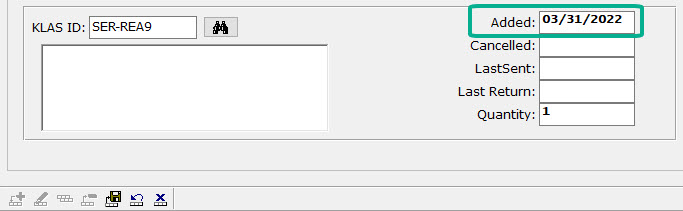
John Owen shared this tip in the roundtable. To prevent unnecessary Serial Reserves being created (and Assigned if the patron is not yet set up for Duplication), set the Start Date for new serial Subscriptions to tomorrow.
By forward-dating the subscription, you tell KLAS not to run the usual programs designed to get physical inventory assigned and out the door to new subscribers ASAP. Instead, the subscription will quietly become active overnight, overnight, and all new issues will be added to the patron's Service Queue as they are Received and the eDocs created.
We hope these insights are useful as you enter the brave new world of providing serials within a duplication on demand service model. As always, please don't hesitate to contact support with any questions.
-
Serials Manual
Do you have questions about maintaining or circulating serials?
The new Serials Manual is here to help!
Like the Reader Advisors Manual and the Front Desk Manual, this document was designed for easy reference both in print and digitally. We also made every effort to ensure this document is accessible for AT users, though the AT Reference Guide may still be helpful in providing additional screen context and description.
A few tips for using this manual:
- If annotating the file to add local policies, consider using Word's comments feature which will maintain the pagination, plus make your comments stand out for easy identification.
- If using the manual in Word, turn on an interactive index by selecting the View ribbon, then marking the Navigation Pane checkbox. In the document itself, Ctrl-Click any section or page reference to jump to that section (including from the Table of Contents).
- If using the manual in a PDF reader, the interactive index and hyperlinked references should be available by default (depending on the program used).
I hope this manual will prove helpful for all your serials needs!
Last Updated 5/5/2025
Please log in to view available downloads. Thank you!
Did I miss something? Let me know!
-
Talking about TBT

Correction: NLS willcontinue distributing the TBT4, there have just been interruptions. I apologize for our earlier miscommunication as we rushed to confirm and distribute information before the holidays.
The Nov/Dec issue was not made because of the shut-down. The Jan-Feb issue is on schedule for production, but the new contractor may not be able to distribute it. While NLS is working with the contractor to get everything back up and running, there are a lot of moving pieces.
If libraries choose, they can take on duplication of Talking Book Topics for their patrons. The good news: you cantreat this like any other NLS-provided serial for duplication. You also have other options.
First things first, understanding the scope:
How many copies do you need/want to send?
How many Active TBT4 subscribers do you have?
You can easily check this on the SER-TBT3 or SER-TBT4 record in your Serial’s module: the Active Subs (subscriptions) count is on the Title tab.
If you want to take a deeper look and exclude patrons that haven’t had any other activity lately, you can Query from the Patron Module:
Quick Search -
- Main Status - Equals - A
- Last Served Date - Is Between - 01/01/2025 - (today’s date)
Advanced Search -
- Subscription - KLAS ID - Equals - SER-TBT4 (or 3, if that is the version used in your database)
- Subscription - End Date - Is Blank
Once you know how many patrons you’re dealing with, some questions to consider:
- Can you duplicate a cartridge for each TBT4 subscriber on a single day? Over the course of a week?
- Do you want to combine TBT cartridges with other serials when possible, or always send it on its own?
- Do you want to make sure it always goes to all Active patrons, even if they haven’t returned previous issues?
- Do you / will you continue to treat TBT as a default subscription, or will you want patrons to Opt In instead of Opting Out?
And one final question to think about:
- Should TBT be a CirculatingSerial (and so update the patron’s Last Served Date), or a Publication(which doesn’tupdate the Last Served)?
In other words, should a patron that only receives TBT and nothing else still count as Active?
(Note: Either Cir or Pub can be used for TBT regardless of whether you decide to go with Option 1 or Option 2 below.)
Option 1 - Send as a Standalone (Our Recommendation)
You can give the duplication-version of the TBT4 serial its own unique Medium. This is our recommendation for most libraries.
Benefits:
- Will ensure that the TBT is sent on its own cartridge without other serial issues.
- Counts towards its own Cutoff, which can be set high to ensure that it goes out quarterly even if the patron is at Cutoff for their books or regular Serials.
- Makes it easy to get specific statistics about how many TBTs you are sending to how many patrons, without inflating your statistics for the other serials.
- Allows for a different schedule for the orders: Nightly so it goes out ASAP when available, or on a different day of the week than the rest of your Serials to help distribute the work.
Downside:
- Requires another entry on the Patron’s Profile tab.
- Yet another Batch to run.
Option 2 - Send with other Serials
Alternatively, you can treat the TBT4 like any other NLS-provided serial.
Benefits:
- No change to your workflow.
- No new Medium required.
Downsides:
- May be buried in the middle of other serials on a cartridge.
- May not go out right away if the patron is at Cutoff.
- May make your serial run overwhelming, depending on subscriber count.
- Will get your TBT statistics mixed into your other Serial statistics.
Alternatives, Supplements, and Other Thoughts
As far as we can tell at this time, everything that is technically needed for you to duplicate TBT4 for your patrons is already in place with just a little set-up needed from Customer Support, primarily the SDS- or MOC-TBT4 title record.
However, as mentioned above, NLS will continue working with the new contractor to distribute TBT4, so you have time to consider how to best serve your patrons.
The PDF and HTML formats will continue to be produced, and the DB monographversion will continue to be made available (although it will continue to be delayed compared to the Serial version, due to the conversion process).
Order forms are available from NLS, although they would need to be printed: Talking Book Topics - National Library Service for the Blind and Print Disabled (NLS) | Library of Congress
We know some of you are already providing your patrons with alternate ways of accessing the material, from mailing out Large Print excerpts (such as sending the chapter on Westerns to patrons who have requested it), to providing Browse links on your WebOPAC for patrons to easily review and request from the genres that interest them.
Are there other ways you want to provide this information, versus duplicating and mailing a cartridge with the full TBT issue?
For example, would you want to do a monthly query for the titles added in your biggest Genres, to print as a bibliography in Large Print and as a PDF?
If you’ve gotten creative with your TBT distribution, please share in the comments below what you’ve tried and what the reception was!
-
TBT Order Forms

The Talking Book Topic order forms can be circulated as a local Large Print serial. If you do not yet have the order forms (usually SER-TBF2) in your Serials module, please contact Keystone Customer Support to request it.
Note: This same process can be used for any other local, physical serials as well.
Outline
- Before Receiving a new Issue
- To Receive the new Issue
- To Print Mailing Cards/Labels
Download
Please log in to download content. Thank you!
Do you send the TBT Order Form as a Large Print serial? Share your tips in the comments--or let us know if you have questions!
See the Serials Manual for more information about handling all local and NLS-produced serials.
-
TBT Strategies
The time has come: Talking Book Topics (TBT3 / TBT4) is being handed over to the network libraries for duplication.
Per our previous article on the topic: you have two options for distribution.
- The quickest, easiest, simplest option is to send it with your other NLS serials (usually as the DS medium). If many of your TBT subscribers also get other serials, they can travel on the same cartridge to save you some labor.
- The option that will give you the most control and the best statistics is to give it a unique medium (such as TBT). This option allows you to send the TBT on a different day of the week from your other serials, and ensures that a patron already at cutoff for serials can still get the new TBT so long as they’ve returned the previous one.
Let us know which medium you want to use, and we’ll get the Serial title set up for you. Either way, new issues will load automatically ready-to-duplicate just like all the former MOCs.
The rest of this article discusses options for reviewing and weeding your subscribers list, sending a form letter, handling the TBT Order Form, and available support.
You have options for how to move forward depending on how hands-on you want to be: if you can invest some time and/or send an Opt-In form letter now, it can save you time duplicating TBT issues for patrons that won’t make use of them.
Reviewing your Subscribers
As discussed in the previous article, we recommend reviewing your subscriber list to make sure that you are only duplicating the catalog for patrons that actually want it.
If you only subscribe patrons to TBT on request and are comfortable duplicating TBT for your current active subscriber count, we can copy that subscriber list to the new serial. On the other hand, if you have a high number of subscribers, and if you have previously subscribed people to TBT by default, you might want to send a form letter (discussed below), and / or do some review and weeding of your subscriber list.
But how to go about doing that?
Patrons to Subscribe:
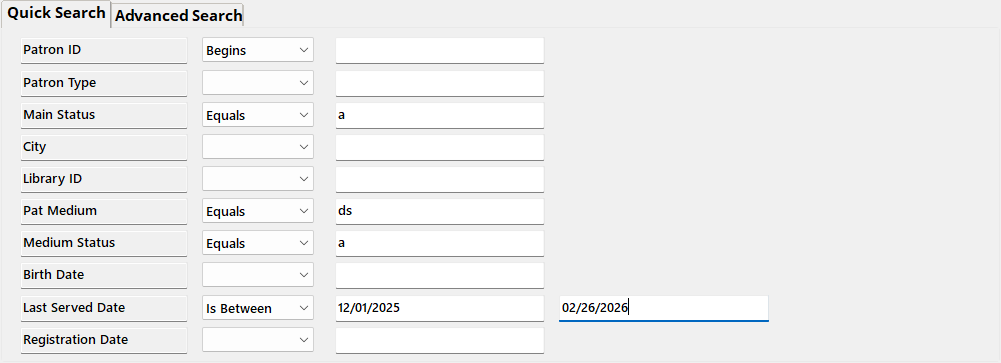
If you are going to send Talking Book Topics as a DS, you can leave anyone already getting other DS serials subscribed to it without any extra work. To find these patrons, Query in the Patron module for:
Quick Search
- Main Status | Equals | A
- Pat Medium | Equals | DS
- Medium Status | Equals | A
- Last Served Date | Is Between | 12/01/2025 | 02/26/2026
[optional parameter to narrow results to patrons that have gotten something in the past three months]
Advanced Search
- Subscription | KLAS ID | Equals | SER-TBT4
[or may be SER-TBT3 in your database] - Subscription | End Date | Is blank

Additional “Patrons to Subscribe” query options:
If your staff adds TBT requests to the Request list instead of directly to the Service Queue, requests can be queried (although the time elapsed since the last TBT makes these more likely to have all gone out by now):
- Media | Pat Medium | Equals | DB
- Media | # Requests | Does not Equal | 0

You could also try Querying for all subscribers with recent DB activity (just sub DB for DS in the first query in this article).
Patrons to Review:
Use Merge Queries to remove the above results from the full subscriber list to see who’s left. Start by running the above query and opening the Query Set by double-clicking any result.
Then query for all active patrons with a subscription to TBT4:
Quick Search
- Main Status | Equals | A
Advanced Search
- Subscription | KLAS ID | Equals | SER-TBT4
[or may be SER-TBT3 in your database] - Subscription | End Date | Is blank
Again, make sure to open the Query Set instead of just exiting the results screen.
Finally, use the Queries menu to select Merge Queries, and set the following:
- Query A: your most recent Query, with all active subscribers
- Query B: second most recent Query, subscribers that are already active in DS (or one of the other “patrons to subscribe” queries.
- Merge: in A, not B
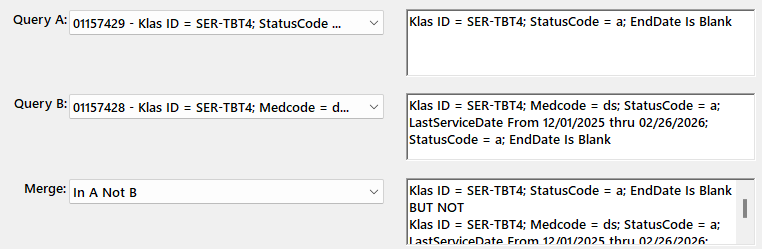
Export this list to Excel with a high enough Max to include all the Merge results, Visible Fields only, for a list you can divvy between staff and/or make notes on.
Double-click any result in the table below to open the Query Set to print Labels for a form letter, to do another merge to subtract another “patrons to subscribe” query from these results, or to start reviewing results in KLAS.
If this still gets you an overwhelming number of results, feel free to get in touch with Customer support to talk through your options!
What to Check For:
Once you have a list of patrons to review, what are you looking for?
Other than general activity and known patron preference, check for signs that the patron has actively been requesting titles. In addition to the Requests tab, you can look at the Items Tab “Selected By” column for QuickRequest or Web. If a patron has just been getting titles by preference, and particularly if they have been requesting titles via the WebOPAC, do they really need or want a recorded catalog? But if they’ve been getting a lot of titles from Quick Request, they got those numbers somewhere–and TBT is a likely source.
You can also watch for BARD patrons. While just having a subscription to SER-DDB9 doesn’t mean the patron is comfortable using BARD, you can check for downloads on the patron’s Items tab as well. If you use a Serve Type of BARD or OB for your download-only patrons, they can easily be excluded from your subscriber list.
Finally, watch for blocks. If a patron just has a temporary block to hold their books while they are on vacation, that doesn’t need to impact your decision. On the other hand, if they have a block for returned mail and no one has been able to contact the patron for over six months, you probably don’t need to duplicate the TBT for that patron just for it to be returned to sender.
Form Letter
You may wish to send notification to all TBT subscribers, or just those targeted for review, letting them know about the change in distribution and asking if they want to remain subscribed.
Simply making the duplicated version of the TBT strictly Opt-In rather than trying to decide which subscribers to keep may be the best option for some libraries, although it does require a print cost for the mailing itself, and it places the burden on patrons who may not be able to easily read and reply to a letter or postcard.
For sending a letter, you can filter the SER-TBT4 subscribers tab to only show Active patrons, and export to excel with All Fields for a mail merge.
Or you can use either the all Active Subscribers query above or the merged query set with the Patron labels function. While in the Query Set, use the Functions menu to select Labels. Switch the radio button to “Entire Query,” and contact us if you need a new Label Stock set up.
About the Order Form
Do you want to print and mail the order form to your patrons? Or only to patrons that request it?
We can add a new Large Print serial for the TBT Order Form, allowing you to subscribe only the patrons that actively want the order form. The downsides of this approach:
- Timing: the new issue of TBT will show up and start going into orders as soon as NLS distributes the file, even if the order form isn’t posted or printed yet.
- Once the order form is available, you would need to manually add the new Issue as you would for a local serial.
Available Support
We will be getting the serial record added for all KLAS libraries. If you want it as a new Medium, we are happy to do all of that set-up as well.
Once you have the new record, you can start adding the subscribers you know you want to keep. If it’s an extensive list even after the review and curation above, we may be able to help.
There’s no particular need to cancel or remove the subscriptions to the SER- version. As with the big MOC transition, I’d recommend leaving them for now so you have the information available to reference. If you want them cancelled for cleanliness sake later on, we can do so.
Finally, remember that the forums are here to help you all help each other! If you create a form letter (or recorded announcement), have other ideas of criteria to check for (either for the “to subscribe” column or the “don’t subscribe” column), or have other strategies and ideas for serving your patrons better for this transition–please share in the comments below!
