

For patrons not in compliance with the NLS Parental Acknowledgement requirements, KLAS can automatically Block the accounts until the acknowledgement is corrected so nothing is sent to them. However, these Blocks are NOT communicated to NLS. Rather, they're a warning flag and a temporary measure while correcting data entry issues.
If you don't have these Blocks set up yet, please contact Keystone Customer Support, so we can enable them for you!
Once the Blocks are in place, use the Blocked Patron Report to easily find these patron records for review and correction.
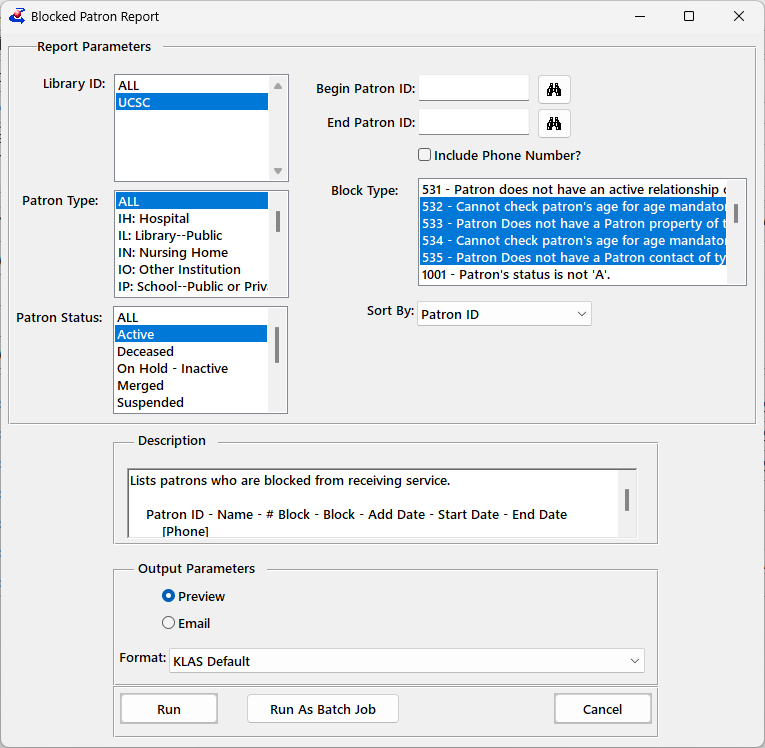
- From the Patron module, select Reports - Activity - Blocked Patron Report
- Select one or all of the Acknowledgement-related Block Types: 532 - 535
- To get the current results now, use the Run button
OR, To automatically get the report on a routine basis, set the Output Parameter to Email, enter your address, and select Run As Batch Job.
Set the Frequency to Weekly, check the day or days on which you want the report, and enter the time to run the report in 24-hour format (for example, 1pm would be 13:00).
Records with any of these Blocks should be either corrected or Suspended immediately. If you find you cannot correct a record or have questions about it, please contact Customer Support with the patron’s name and ID.
We are seeing that many of the Active records not in compliance are cases where only part of the Acknowledgement is missing. For example, a patron may have a "Yes" answer but the Parent/Guardian Alt Contact is missing. There are different blocks for each part of the acknowledgement (Birth Date, Acknowledgement Answer Property, and Alt Contact), so patrons with only one of these Blocks are usually a quick fix!
