

We have had a number of inquiries from states reviewing their Web Content Accessibility Guidelines (WCAG) compliance ahead of local deadlines. State government accessibility requirements apply to many of your online catalogs and ordering sites, but there’s no cause for alarm. Accessibility has always been a fundamental requirement for KLAS’ WebOPAC and WebOrder.
WCAG requirements, and the technology with which to meet them, evolve over time. And of course, our developers are only human. Sometimes they make errors, and they can only fix those issues that are identified and reported. To this end, we have recently been implementing a number of fixes and improvements to WebOPAC / WebOrder accessibility that were identified as part of thorough scans and evaluation by a couple customers and ourselves.
These fixes include things like filling in missing labels, fixing labels which stopped functioning reliably due to changes in standards, and adjusting heading hierarchies to ensure that a page does not skip directly from (for example) Heading 1 to Heading 3.
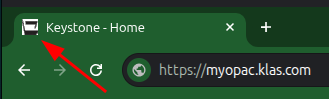
Other Accessibility improvements to WebOPAC include: a “Skip to Main Content” link, allowing Screen Reader users to jump over the heading and navigation content; implementation of ARIA regions; and the addition of a customizable “favicon”--the small icon to the left of the page title in the browser’s title bar region.
We continue to work on improving both the OPAC and WebOrder interfaces and will release an updated VPAT (Voluntary Product Accessibility Template) soon to document that both are meeting or exceeding the WCAG 2.1 Level AA requirements.
However, bear in mind these systems are very customizable, and we only evaluate the base product, not your specific implementation. Many elements of the Accessibility Guidelines, such as color contrast, are set by your individual styling template and local settings. Therefore, please take the time to review your WebOPAC / WebOrder for:
- Color contrast
- Font selection
- Brand compliance as applicable
- Alt Text on all logos
- Meaningful link text (Example: a link should be “review available browse lists” NOT “review available browse lists here” with only the “here” linked)
If you need to adjust any of the above, find other errors or updates that need to be made to your WebOPAC / WebOrder’s styling and configuration, or have a favicon to use for your site, please contact Keystone Customer Support.
Finally, if your organization completes a product scan or other evaluation, we welcome your findings and we will work to address any violations you may find ASAP.
